Payments are experiencing issues due to temporary restrictions in Russia. If your payment does not go through, please submit a support request.•Our support team is available 24/7 — we are always here to help with hosting and server issues.•We are now accepting requests for dedicated server rental and colocation services in our data center.•Reminder: we recommend enabling backups for additional data protection.•A new VPS/VDS lineup with NVMe storage and improved performance is now available.•Maintenance work on some servers has been completed. All services are operating normally.•
Payments are experiencing issues due to temporary restrictions in Russia. If your payment does not go through, please submit a support request.•Our support team is available 24/7 — we are always here to help with hosting and server issues.•We are now accepting requests for dedicated server rental and colocation services in our data center.•Reminder: we recommend enabling backups for additional data protection.•A new VPS/VDS lineup with NVMe storage and improved performance is now available.•Maintenance work on some servers has been completed. All services are operating normally.•
Аккаунт в General iT
Вход / Регистрация
Войдите или создайте аккаунт для управления услугами в личном кабинете.
Страны не найдены. Попробуйте другое название или код.
MODULE FOR 1C-BITRIX
AitiNebo: User Fields
AitiNebo: User Fields
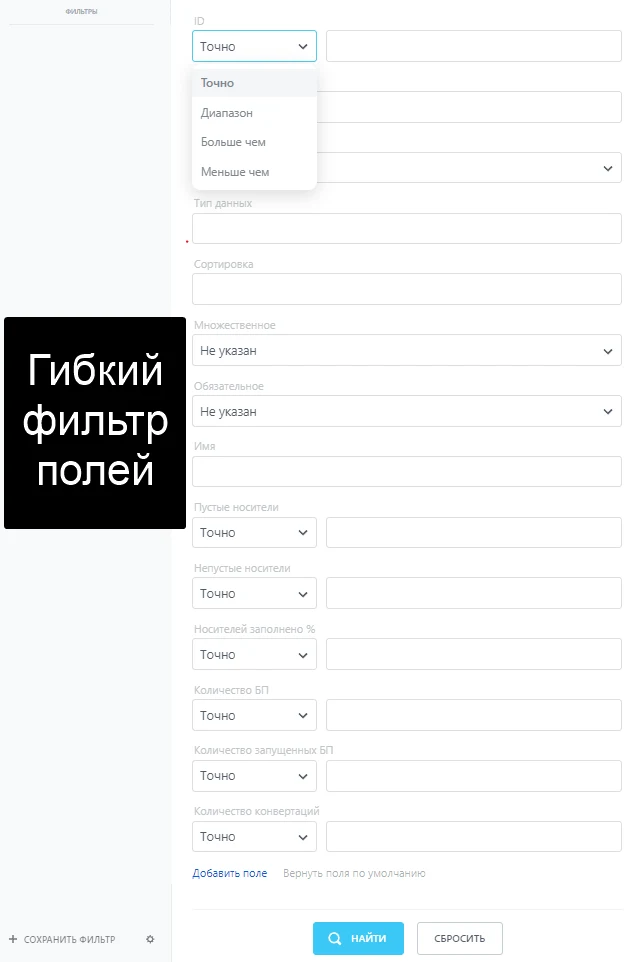
The "User Fields" module for Bitrix extends standard CRM capabilities, providing an enhanced toolkit for managing custom fields. The interface allows users to manage fields, including deletion, restoration, and status monitoring.
The functionality includes moving fields to a backup table for subsequent restoration in case of errors or requirement changes.
The "User Fields" module for Bitrix extends standard CRM capabilities, providing an enhanced toolkit for managing custom fields. The interface allows users to manage fields, including deletion, restoration, and status monitoring.
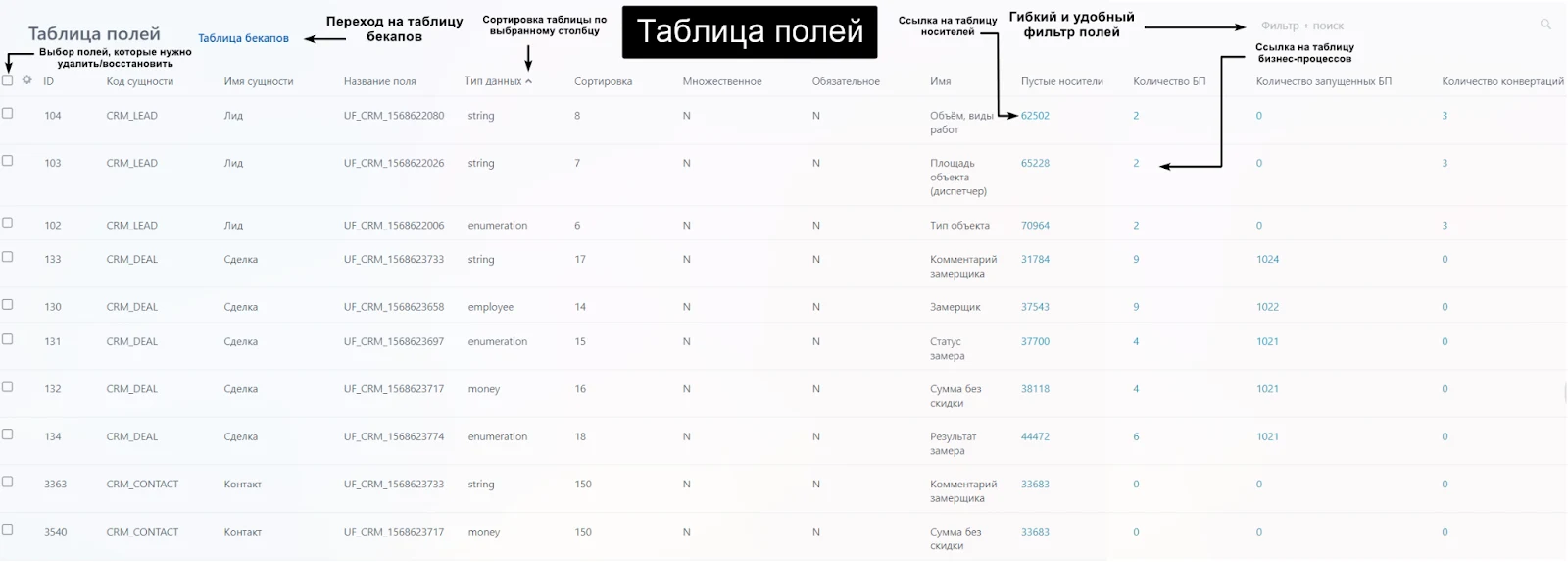
The functionality includes moving fields to a backup table for subsequent restoration in case of errors or requirement changes. The system displays current data on the conversion of each field, helping to optimize their application.
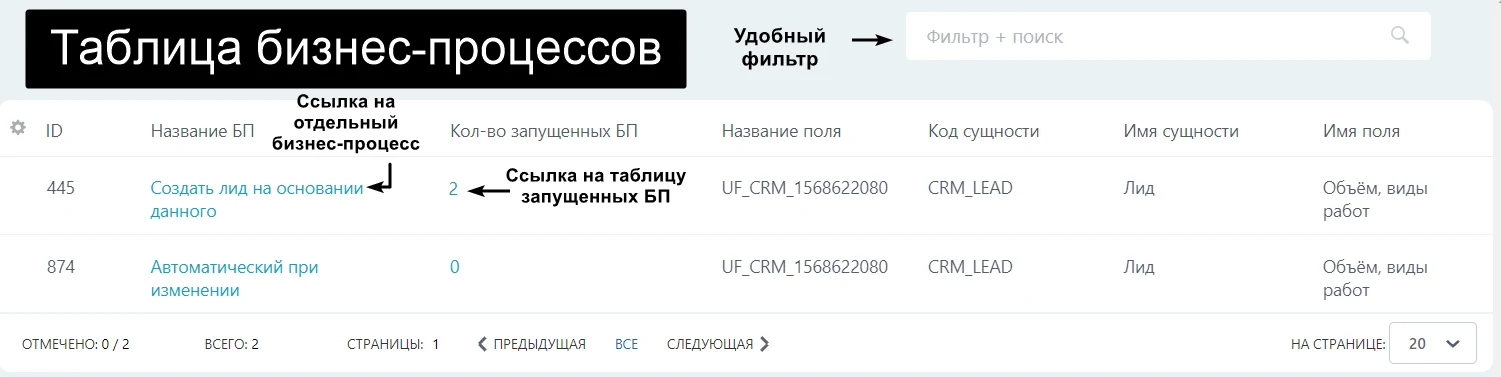
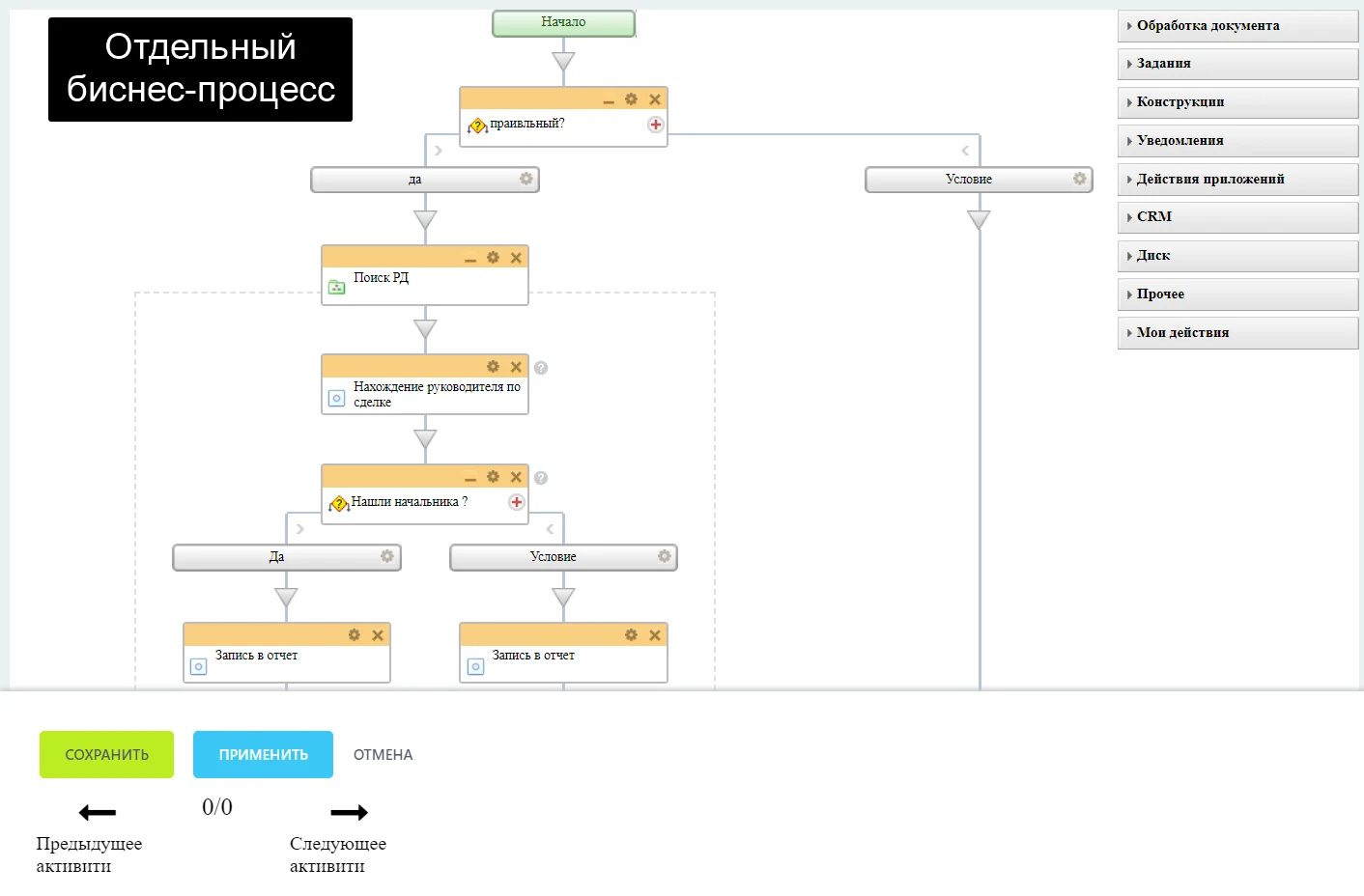
Additionally, the module analyzes the integration of fields into business processes. It shows which processes use specific fields, including active and currently running operations. This allows for an assessment of the relationships between data and processes, as well as their impact on CRM efficiency.
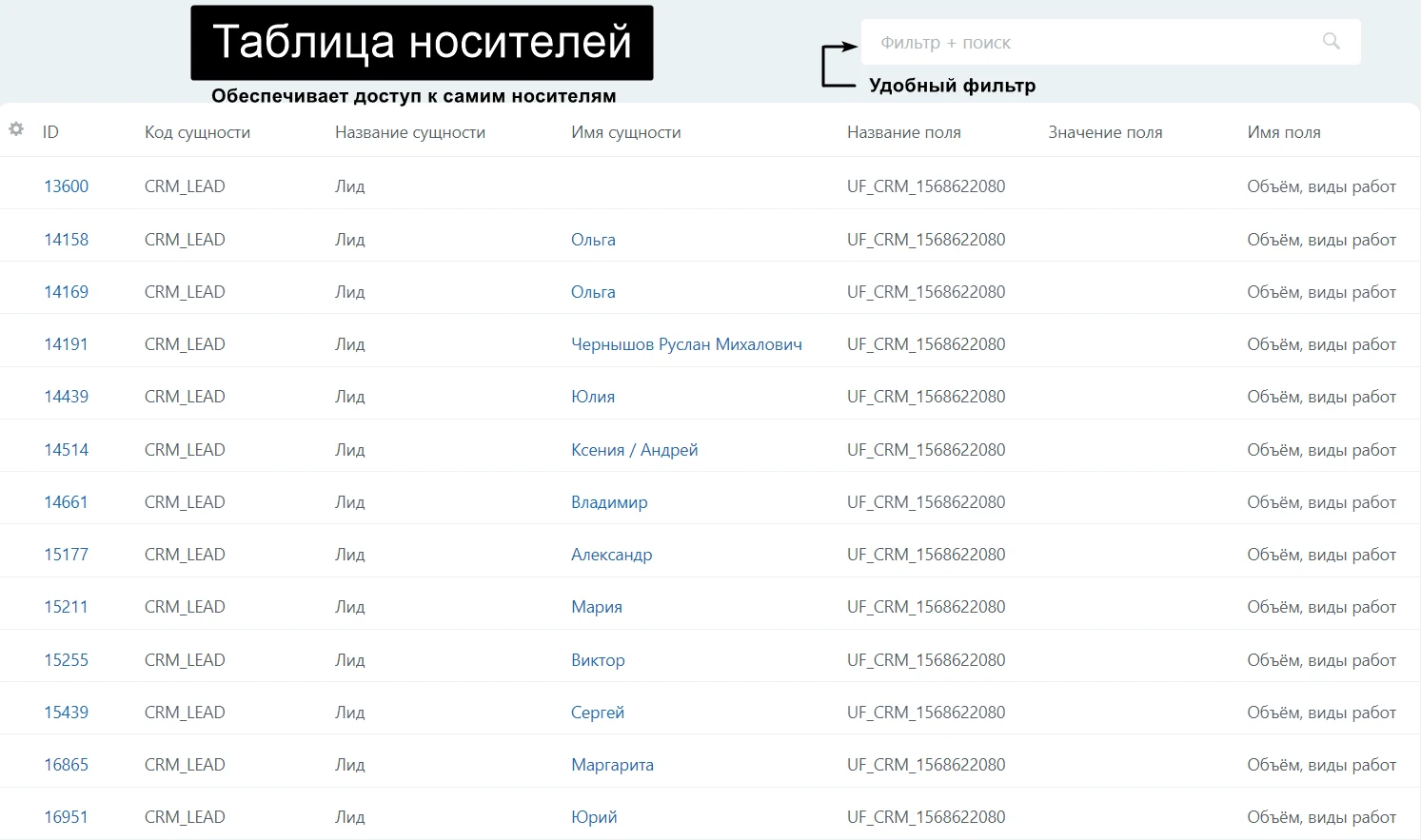
The User Field Carriers Viewer module allows you to identify which CRM objects (leads, deals, contacts, etc.) contain specific fields. This helps assess their scope of application and effectiveness.
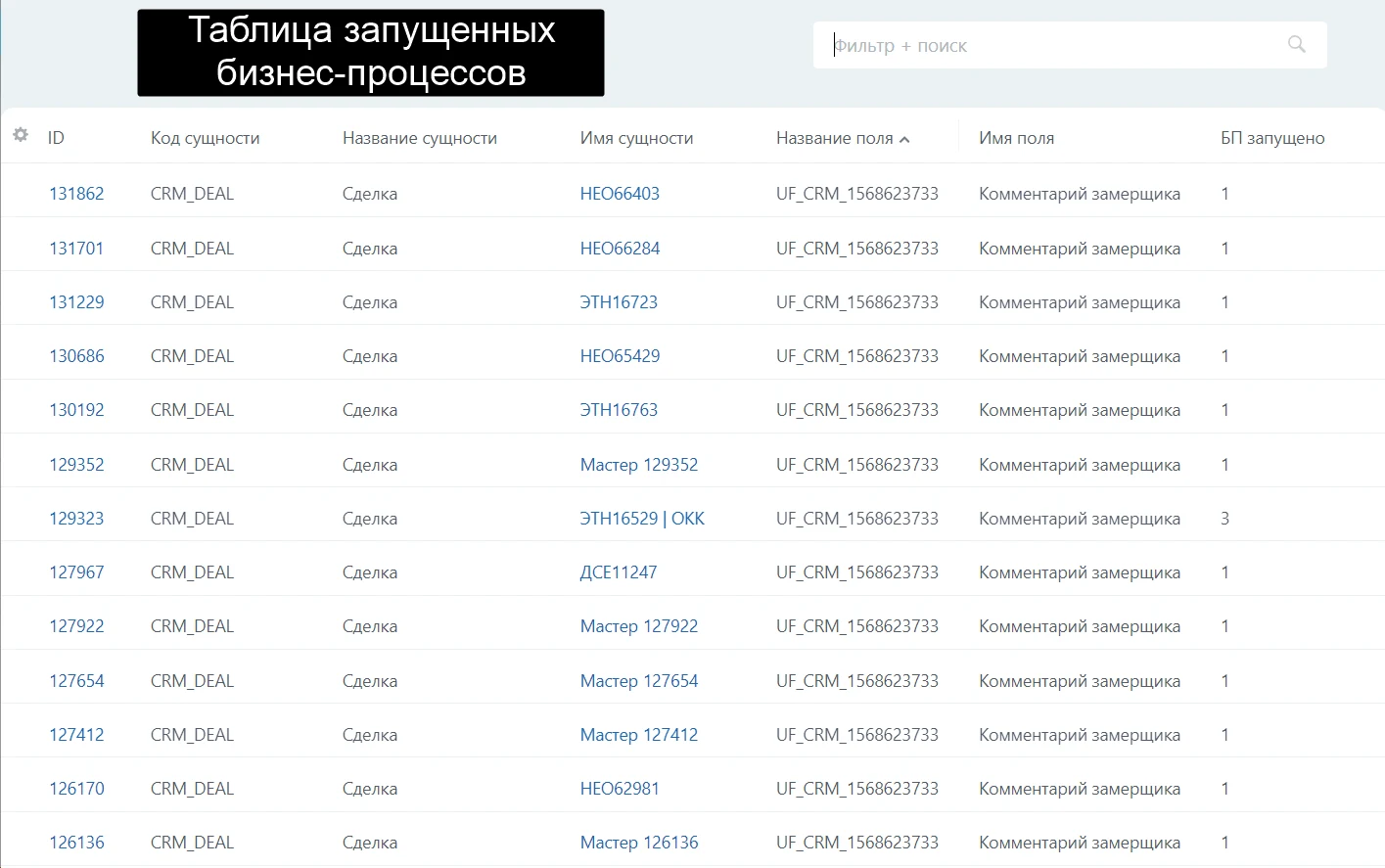
Information is displayed in tables and interactive business process templates, with the ability to switch between activities that use a specific field. Tables are divided into two groups: main and additional. Main tables contain information about fields and their backups, along with links to additional tables holding data on carriers and business processes. All tables feature convenient search and flexible filtering options.
Users can navigate between tables to access various information.
Fields table: from here, you can navigate to media tables and business process tables. If the fields table is cached, its cache can be refreshed.
The backup table allows access to business process tables, enabling the restoration of deleted fields or their permanent removal.
The carriers table provides access to the carriers themselves where user fields are used.
Business Process Table: allows navigation to the host where a business process is running or to its template for editing and viewing activities containing user-defined fields.
To open a specific business process, click the corresponding link in the "BP Name" column.
In the business process table, clicking the link in the 'Number of running BPs' column opens a separate table listing the current instances of the selected process.
The "Nebo UserField" module simplifies and optimizes work with user fields in Bitrix CRM. It provides tools for analyzing, managing, and restoring fields, improving CRM efficiency and reducing time spent on routine tasks.
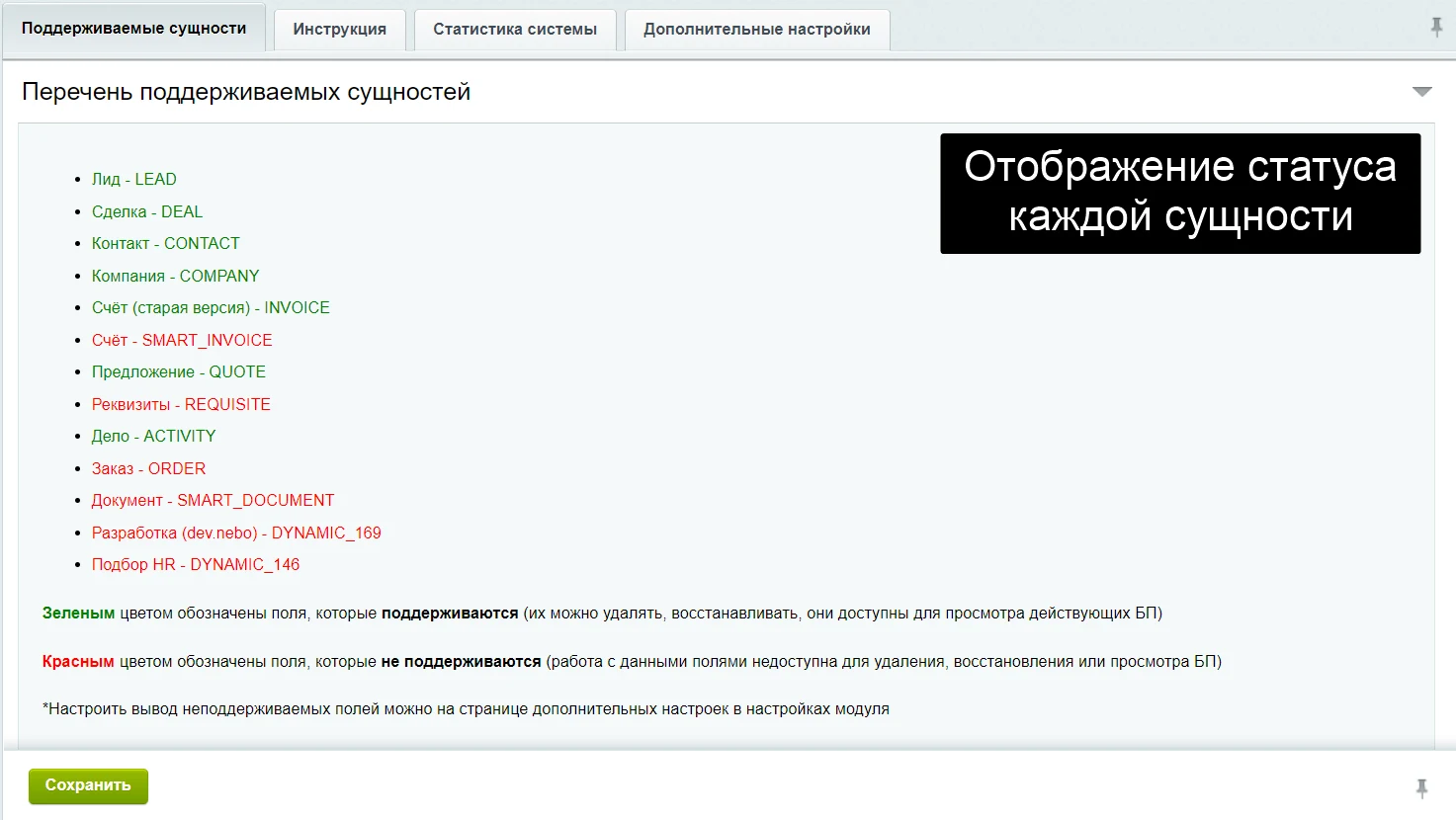
The module settings include a visual status indicator for entities. Each entity type (Lead, Deal, Contract, Company, etc.) is marked with a color: green indicates a supported entity available for deletion, restoration, and business process viewing; red indicates an unsupported entity that cannot be processed. The option to display unsupported fields is available in the module's additional settings page.
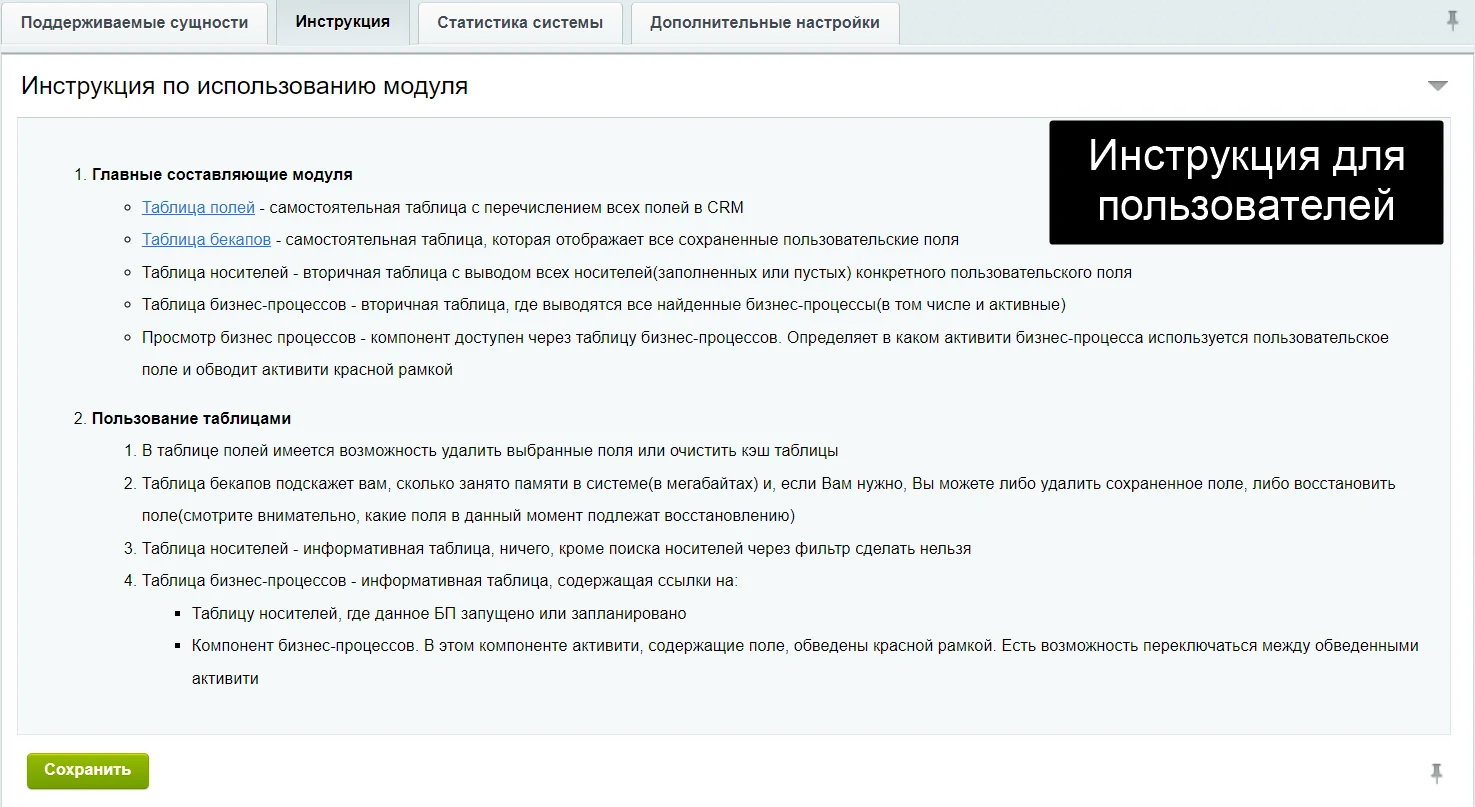
The module contains reference information for users who need to refresh their knowledge of the basic functions for working with user fields.
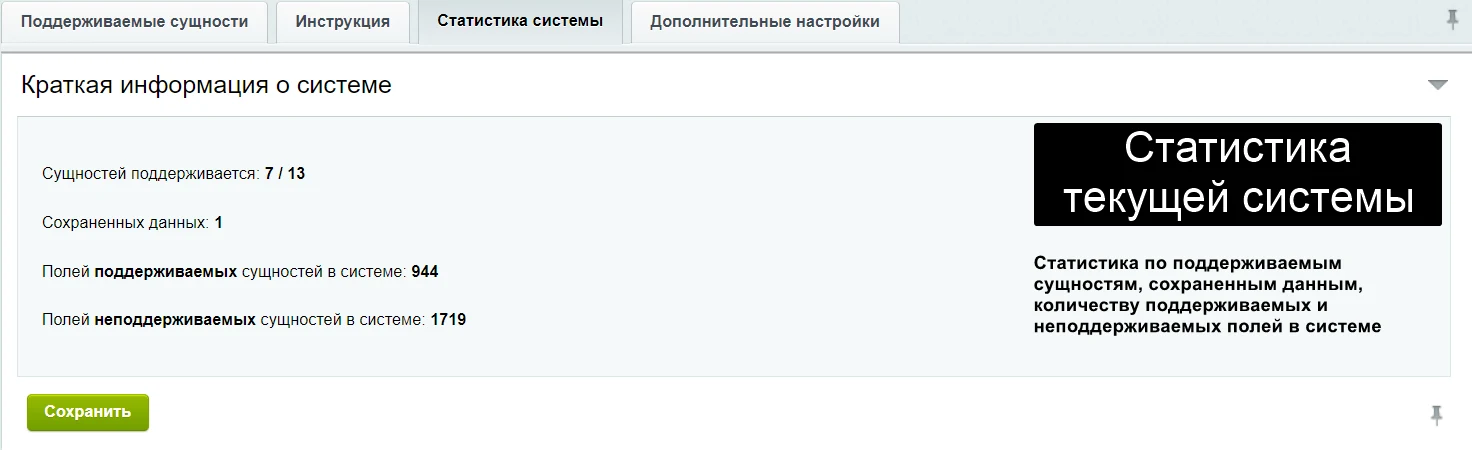
The module provides statistics on supported entities, stored data, and the count of supported and unsupported fields in the system.
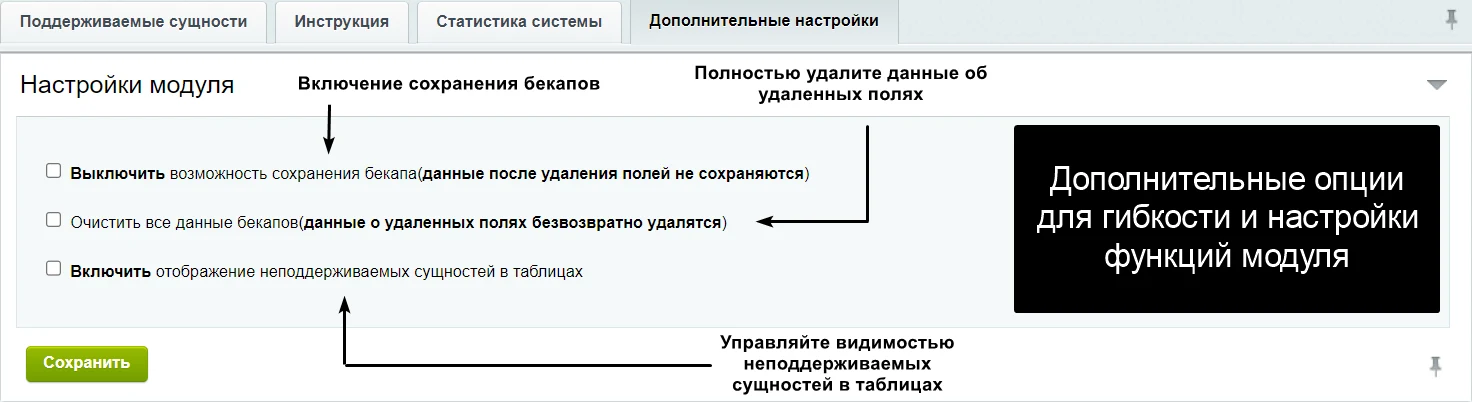
Additional module settings provide flexible options for managing its functionality.
Enable backup retention: data from deleted fields is preserved for potential recovery.
Clear all backup data: permanently removes information about deleted fields without the possibility of recovery.
Enable display of unsupported entities in tables: allows controlling the visibility of unsupported entities in the module tables.
Module settings expand the capabilities for working with custom fields in Bitrix CRM, increasing the tool's flexibility and functionality.
General iT can install and configure this module and check how it works on your website.
USER EXPERIENCE
Solution reviews
How does this solution work in a real project? Share your experience and help others choose.
Be the first to share your experience
There are no reviews of this solution on git.ru yet. Tell us what worked well and what could be improved.
✓
Verified purchaseAdd a key if you wish. A verified review gets a badge, priority placement and more rating weight.
↗
Open to every clientJust sign in to your account. A key is optional; all reviews are moderated.
The module is designed for online stores running on the 1C-Bitrix platform to automate the integration of supplier product catalogs. It is also suitable for news and city portals to facilitate content population. The solution supports data import in Excel, XML, YML, CSV, and RSS formats.
The module is designed for the «1C-Bitrix: Site Management» platform and enables importing infoblock elements, including products, from Excel files. It also supports data loading into Highload blocks.
The module is designed for importing products and sections from XML, YML, and JSON files. It supports loading any product fields and properties, as well as updating stock levels and prices. Product-to-section binding is supported, along with importing section structures from a file into an arbitrary site structure.
At the last check, the supplier reported that this solution had been unpublished. Its description remains available for reference. Licence availability and support terms need to be confirmed before use.
How can I find an alternative?
Tell us what the module or template needs to do and which platform edition you use. We will check available options, compatibility and any data migration needs, then agree on the scope of work.
Statistics and interaction recording
Public pages use basic statistics. Our recording and Yandex Webvisor require your permission. You can keep basic statistics or disable all analytics.
Operator: General IT Rus LLC, INN 2310208877. Statistics and recording help improve the website.
Basic statistics: pageviews, a random daily ID, a public URL and time. The ID lasts until Moscow midnight. Original records: up to 48 hours; totals: up to 7 years.
Campaign tags and a technical identifier are sent by our server to the existing Yandex tag. Visitor IP, User-Agent and cookies are not included in this transfer. If selected, its browser code collects technical data, cookies, actions and masked page snapshots; recordings last 15 days. Inputs, chat and account areas are hidden.
Interaction recording requires permission: clicks, scrolling, technical information and filtered public-page snapshots. Events: up to 7 years; IP and snapshots: up to 90 days.
Permission is remembered for up to 365 days; full opt-out remains until changed. Basic statistics only disables recording; Disable all analytics stops new analytics. Previously sent data is not automatically deleted. Withdrawal and requests: support@git.ru. Full terms are linked below.
Your browser requests no tracking: analytics is off.