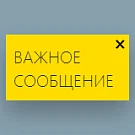
Important Message
The Beono Flash Message module is designed to promptly inform website visitors about critical events, such as scheduled maintenance, new service launches, or updates to the user agreement. Unlike news feeds or email campaigns, which do not guarantee immediate visibility, this tool displays notifications on every page of the site for each active user.

Adaptive partner slider
The component displays a list of news items as an adaptive slider. It provides viewing of data from an information block and navigation through the news feed. All content management parameters match the standard 1C-Bitrix news.list component: sorting configuration, selection of displayed fields, definition of the information block, date formatting, and the number of news items per page.

VK Wall Posts | VK | VKontakte Posts on Your Site
The VK POSTS module integrates with the VKontakte social network to display a slider of posts from the wall of a selected group or user. The solution requires no service keys or creation of a separate VKontakte application; simply specifying the account name enables immediate operation. The module includes a component that renders VKontakte posts from pages defined in information blocks.

News in Telegram
This module is designed for news resources that maintain Telegram channels. It enables automatic publication of added news to specified channels. Configuration options allow selecting information blocks containing news for distribution, customizing the post template, and assigning different Telegram channels to different information blocks.

News Aggregator 4.0 (RSS Content Parser + SEO)
The module aggregates entries from RSS feeds and saves them to site info blocks. Display of the content on the public part of the site is configured separately. Many resources provide ready-made RSS feeds.

Adaptive slider with parallax effect
The adaptive slider with parallax effect displays a news list from an information block as a slider. The component provides news viewing and navigation through the list. It supports all settings of the standard 1C Bitrix news.list component, including sorting, field selection, information block definition, date formatting, and the number of displayed news items.

Interactive News Slider
The interactive news slider displays a list of items from an information block in slider format. The component provides news viewing and navigation through the list. It supports all settings of the standard 1C-Bitrix news.list component, including sorting, field selection, information block definition, date formatting, and the number of displayed items.

Adaptive 3D Slider
An adaptive 3D slider for displaying a news list from an information block. The component supports news navigation and inherits all settings from the standard 1C-Bitrix news.list component, including sorting, field selection, information block definition, date formatting, and the number of items per page. Slider settings include two built-in templates.

Yandex.Zen RSS - PRO
The Yandex.Zen RSS PRO module by Dev2Fun is designed to display and manage an RSS feed for Yandex.Zen content. The module includes a display component, flexible configuration options, and a ready-to-use example file. Key features include feed caching with management controls and automatic cache reset upon saving settings.

RSS News
The module displays an RSS news feed from external websites that support the RSS format. Installation is performed according to the "1C-Bitrix: Marketplace" instructions.

News list with 3 effects
The module renders a news list from an information block with visual effects. Functionality includes standard features of the 1C-Bitrix news.list component: sorting configuration, selection of displayed fields, information block definition, date formatting, and page news limit. Flexible container settings are provided.

News list with effects
The component renders a news list from an information block with visual effects. It fully supports all settings of the standard 1C-Bitrix news.list component, including sorting, field selection, information block definition, date formatting, and items per page. Container type can be configured as fixed width with a 1170-pixel limit or full-width spanning the screen or parent block.

News Carousel
The component displays a news list from an information block as a carousel. It provides news viewing and list navigation. All parameters of the standard 1C-Bitrix news.list component are available for configuration, including sorting, output fields, information block selection, date format, and the number of news items per page.

PR-Volga: Vkwallfeed. Adaptive component for displaying a news feed from a VK group
Adaptive component for displaying a news feed from a VKontakte group. Designed for integration into web projects.

Publish content from Bitrix to Telegram
The module automates publishing news from information blocks to Telegram channels. Any change to an information block element—creation, update, or deletion—triggers the corresponding action in Telegram. Messages are sent in the format: element title followed by the announcement description.

Publication in Telegram
The Telegram integration module for 1C-Bitrix automates the publication of content from site info blocks into Telegram channels, groups, or chats. This maintains content freshness without manual copying or formatting. When an info block element is created or edited, the module generates a post based on the title, announcement description, and image.

News Slider
The component displays articles or other informational blocks in a rotating mode with a switcher. This module was created as a learning example during the early days of the Marketplace. Although it performs its basic functions, its architecture requires improvement. Further development of the component is not planned, so it is recommended to use it in its current state.

RSS PRO - Flexibility and Simplicity
The RSS PRO module provides flexible output and management of RSS feeds. It supports selecting multiple information blocks simultaneously, applying custom filters, and performing pre-output modifications via event handlers. Available events: OnBeforeRequestElements — triggered before requesting elements.
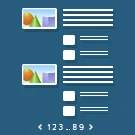
Sections with Elements
The 'Sections with Elements' module includes a component, an installer, and an uninstaller. The component outputs a list of sections based on settings and a user-defined filter (default $arrSectionFilter), as well as associated elements using their own settings and filter (default standard $arrFilter).

Give Me Feed RSS Importer
The module imports ready-made publications from the public Give Me Feed RSS feed into a selected information block. Automatic feed checks occur every two minutes via the Bitrix agent. Items are published immediately or saved as inactive drafts. Duplicate protection is based on the SHA-256 hash of the feed URL and the RSS GUID.

AI News
The AI News module automates the creation of news articles and blog posts, relieving editors of routine writing tasks. To generate content, simply specify the topic; the system produces a structured text with a title and ready-to-use HTML markup. Content appears instantly in product cards or news blocks.

Weather Forecast (Text)
The module displays the current weather forecast and the daily forecast in text format, using data from the Gismeteo.ru service. Installation is performed in accordance with the 1C-Bitrix Marketplace instructions.

PWD: Corporate News: Feed, Polls, Media Hub
The PWD: Corporate News: Feed, Polls, Media Hub module is a centralized media hub built on Bitrix24, designed to organize corporate information flows. The solution enables rapid news publishing, content segmentation, and professional formatting to reduce information noise for employees.

Adding date to symbolic code
The 'Add Date to Symbolic Code' module is designed for content managers who encounter identical titles when publishing elements such as news items, products, services, and other types. The tool automatically appends the current date to the element's symbolic code, preventing duplicate entry errors. Installation and configuration steps are detailed in the video guide.